Skip to content

Cloud Native HISP Deployment Model

The cloud native model consists of smaller individual processes (i.e. micro-services) performing specific functional tasks and exposing APIs either via REST or asynchronous messaging interfaces. Generally the REST interfaces are used to retrieve and maintain the system's configuration data while the messaging interfaces are used to move Direct messages from one processing step to another using a streaming/pipelining paradigm.

Each micro-service is a discrete Spring Boot fat jar application and be deployed on multiple platforms ranging from bare metal systems to highly managed cloud provider runtimes such as Google Cloud Run. This document provides details on how to launch each micro-service as a stand alone Java process, however each micro-service can be deployed using any number of options such as Docker, CloudFoundry, Kubernetes, Google Cloud Run, etc. Instructions for each targeted platform are out of the scope for this document as they may incur additional platform specific steps such as containerization.

In addition, this deployment model uses asynchronous messaging to dispatch Direct messages from processing stage to the next. The deployment requires the deployment of a messaging system such as RabbitMQ or Kafka (the default deployment model uses RabbitMQ).

The following is the list of micros-service making up the core of the reference implementation deployment

  • Configuration Service
  • Configuration UI
  • Message Monitor
  • SMTP/MQ Gateway
  • Security and Trust Agent
  • Apache James (for message sending/retrieving and last mile delivery only)
  • XD

Topology Overview

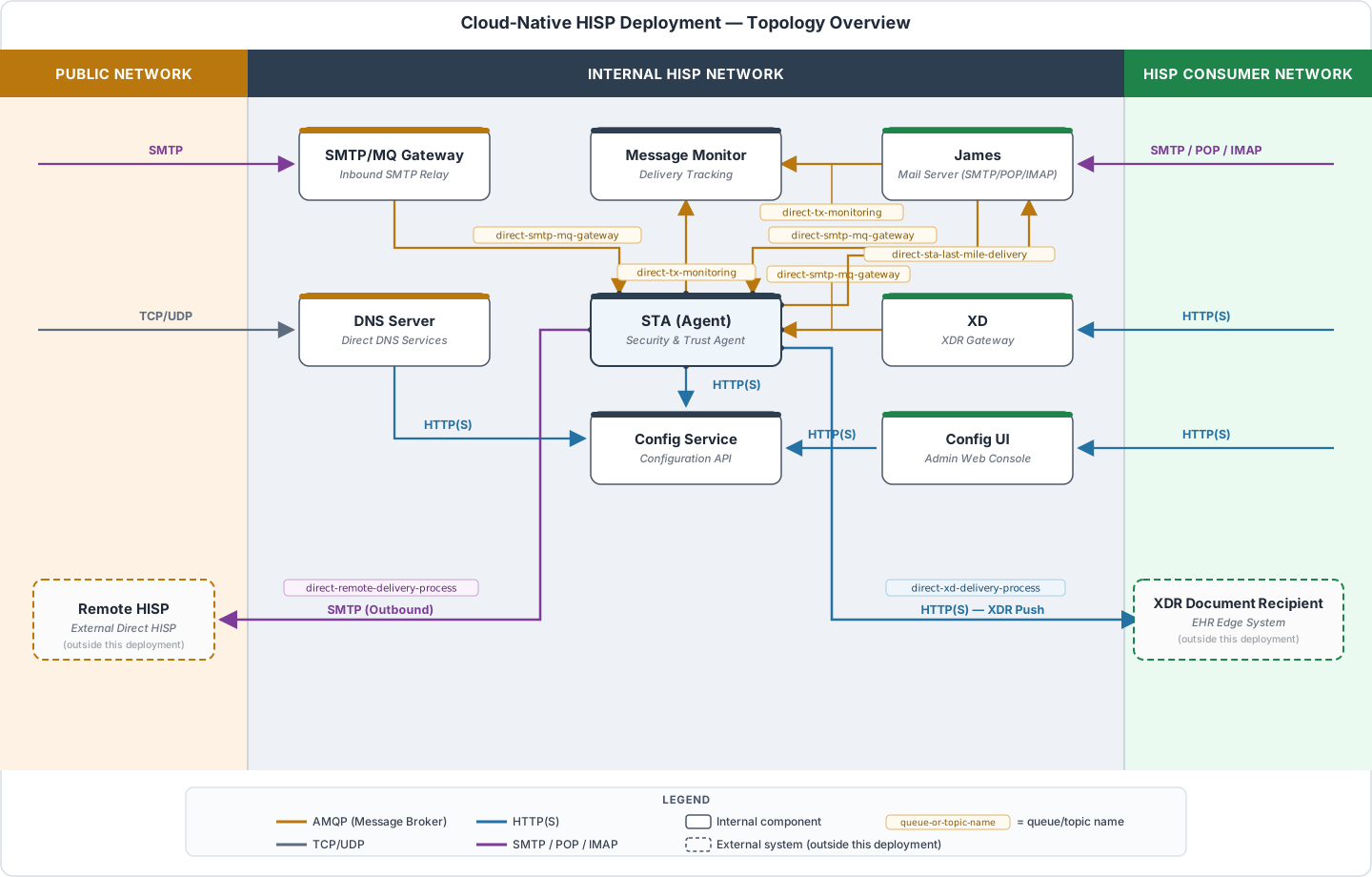
The following rough diagram illustrates the micro-services in the cloud native deployment model and how they communication with each other. For simplicity, supporting services like the RabbitMQ and databases have been removed from the diagram, but they generally exist within the internal HISP network.

directRICloudNativeOverview

It's worth noting early that unlike the legacy deployment model, the cloud native model does utilize two different SMTP servers: an external facing server for receiving messages from other HISPs and an internal server for last mile delivery, message storage at rest, and sending out bound messages.

Micro-Services List

The following list outlines each micro-service, the jar file that comprises the services (each is a single SpringBoot fat jar), and a description of the service.

ServiceJar FileDescription
Config Seviceconfig-service.jarHolds configuration service for the HISP such as domains, DNS entries, trust bundles, and certificates.
Config UIconfig-ui.warFront end web UI application to configure the HISP including domains, DNS enttires, trust bundles, and certificates.
Message Monitordirect-msg-monitor-sboot.jarTracks the status of notifications of Direct messages and generates error messages if required notifications are not received. Notification statuses are sent from other micro-services (STA and James) via the message broker (eg. RabbitMQ)
SMTP/MQ Gatewaydirect-smtp-mq-gateway.jarExternaly facing SMTP server intented to receive Direct messages from external HISPs. It forwards Direct messgaes into the message processing stream via the system's message broker. NOTE This SMTP server does not providce comercial capability such as anti spam filters or malware detection. It may be advisable to front this SMTP server by a commercial SMTP if you have needs for commercial capabilities to control of incoming messages.
Security and Trust Agentdirect-sta-sboot.jarExecutes the main security and trust agent logic as define the Direct specification. Also handlels processing XD stepping and forwarding processed messages to either external HISPs or internal final destination depending of the sender and receiver of the messages. Internal final destination are either the James server application or XD endpoints.
Apache Jamesdirect-james-serverMail server for HISP end users. It allows end user to send and receive messages using mail clients meaning it is a final destination for incoming Direct messages. It also handles sending MDN dipatched messages when requested by the oroginal sender. Outgoing and incoming messages are send to and from the STA via the message broker.
XDxd.warImplements an XD endpoing for the purpose of end users sending outgoing messages using the XDR protocol. Outgoing and messages are send to and from the STA via the message broker.

Deploymen RabbitMQ

The cloud native deployment implements an asynchrous messaging paradigm to move messages from one micro-service to the next which requires the introduction of a message broker. The default broker used by the reference implemenation is RabbitMQ.

There are serveral options for deploying RabbitMQ from multiple sources both using commercial and open source offerings. The RabbitMQ documentation provides a good instructions for installing a multitude of options. For simplicity sake, an easy option is simply deploy RabbitMQ using a docker container with the following command:

docker run -it --rm --name rabbitmq -p 5672:5672 -p 15672:15672 rabbitmq:4-management

This will run RabbitMQ with both the broker and management components with a user/password of guest/guest (which are the default credentials used by the Direct micro-services).

Download Micro-service Binaries

The deployment in this documentation will download each micro-service jar/war file from maven and place each in its own directory. You will effectively just be running the micro-services as simple java applicatoions on bare metal machine.

Obtain each jar/war file from maven and place each into own directory on your target machine. The table below lists each micro-service along with a link the jar/war and suggested directory name for the service.

ServiceJar FileDirectory
Config Seviceconfig-service.jarconfig-service
Config UIconfig-ui.warconfig-ui
Message Monitordirect-msg-monitor-sboot.jarmessage-monitor
SMTP/MQ Gatewaydirect-smtp-mq-gateway.jarsmtp-gateway
Security and Trust Agentdirect-sta-sboot.jarsta
Apache Jamesdirect-james-serverjames
XDxd.warxd

Launch Microservices

You can technically launch each micro-service using a simple java -jar command, however that option is not recommended. Instead, the following shell script is suggested. Simply copy the template to each micro-service directory and replace the <binary> place holder with the name of the jar/war file in that directory. It is suggested to name the file service.sh or service.bat, but you can name it whatever you want. The rest of this section will assume you named it service.sh or service.bat depending on your operation system. You will also need to create a conf directory in each micor-service directory and add a logback.xml file. The suggested contents of each file is shown below.

  • Unix/Linux/MacOS (service.sh)
sh
bi#/bin/sh
case "$1" in
    start)
        echo Starting Sevice
        nohup java -Dworking.directory=. -Dlogging.config=file:conf/logback.xml -jar <binary> > /dev/null 2>&1  &
        echo $! > ./pid
        echo "."
        ;;
    stop)
        echo Stopping Service
        kill $(cat ./pid)
        rm ./pid
        echo "."
        ;;
    restart)
        echo Stopping Service
        kill $(cat ./pid)
        rm ./pid
        echo "."
        echo Starting Service
        nohup java -Dworking.directory=. -Dlogging.config=file:conf/logback.xml -jar <binary> > /dev/null 2>&1  &
        echo $! > ./pid
        echo "."
        ;;
    console)
        echo Starting Service
        java -Dworking.directory=. -Dlogging.config=file:conf/logback.xml -jar <binary>
        ;;
      *)
        echo "Usage: service start|stop|restart|console"
        exit 1
        ;;
esac
  • Windows (service.bat)
java -Dworking.directory=. -Dlogging.config=file:conf/logback.xml -jar <binary>
  • logback.xml
<?xml version="1.0" encoding="UTF-8"?>
<configuration>

        <contextListener class="ch.qos.logback.classic.jul.LevelChangePropagator">
                <resetJUL>true</resetJUL>
        </contextListener>

	    <!--  Appenders for console and logs -->

        <appender name="CONSOLE" class="ch.qos.logback.core.ConsoleAppender">
                <encoder>
                        <pattern>%d{HH:mm:ss.SSS} %highlight([%-5level]) %logger{15} - %msg%n%rEx</pattern>
                </encoder>
        </appender>

        <appender name="LOG_FILE" class="ch.qos.logback.core.rolling.RollingFileAppender">
                <file>./logs/dns-server.log</file>
                <encoder>
                        <pattern>%d{HH:mm:ss.SSS} [%-5level] %logger{15} - %msg%n%rEx</pattern>
                </encoder>

                <rollingPolicy class="ch.qos.logback.core.rolling.TimeBasedRollingPolicy">       
                   <fileNamePattern>./logs/dns-server.%d{yyyy-MM-dd-HH-mm}.log</fileNamePattern>
                   <maxHistory>30</maxHistory>
                </rollingPolicy>
        </appender>


        <root level="INFO">
                <appender-ref ref="CONSOLE" />
                <appender-ref ref="LOG_FILE"/>
        </root>

</configuration>

Finally, launch each micro-service. The order doesn't really matter other than you need to have the config-service running first. To start the services, simply run ./service.sh start or service.bat from each directory. If you need to debug the output interactively, you can run ./service.sh console on Unix based machines to see the logs in your terminal (vs only seeing them in the log file). To stop the service, simply run ./service.sh stop or press CTRL+C if running interactively.

Once the services are up and running, you can perform a preliminary test that system is working by accessing the Config UI at http://<server IP>:8080/

Modify Service Default Configuration

Each service is coded with a default set of configuration values, however you may want/need to override these setting to suite your deployment needs. For example, the configuration service and James uses a local file based database with default credentials. It is likely that you will want to use a "real" database running on a dedicated machine like MySQL or Postgres. The same goes for RabbitMQ where you will probably not want to use the local RabbitMQ instance running in docker with the guest/guest credentails.

Spring supports several options for providing application configuration, and a simple way to override the default settings is to use an application.yaml file placed in each directory that needs custom configuration settings. The following tables list some of the common application settings that you may want to customized depending on your needs.

Configuration Service

NameDescriptionDefault Value
spring.r2dbc.*Database connection configuration. See Spring data properties settings for full details.url: r2dbc:h2:file:///./embedded-db/nhindconfig
username: sa
password: ""
spring.sql.init.platformPlatform to use in the default schema generation script. Supported options are h2, mysql, and postgresqlh2
spring.security.user.nameThe basic auth username to access the configuration service API.admin
spring.security.user.passwordThe basic auth password to access the configuration service API.d1r3ct;

Configuration UI

NameDescriptionDefault Value
direct.webservice.security.basic.user.nameBasic auth user name to access to the configuration service API.admin
direct.webservice.security.basic.user.passwordBasic auth password to access to the configuration service API.d1r3ct;
direct.config.service.urlURL of the configuration service APIhttp://localhost:8082/
direct.configui.security.user.nameUsername to login into the configuration UI web applicationadmin
direct.configui.security.user.passwordPassword to login into the configuration UI web applicationdirect

Message Monitor

NameDescriptionDefault Value
spring.data.*Database connection configuration. See Spring data properties settings for full details.url: jdbc:derby:msgmonitor;create=true
username: nhind
password: nhind
spring.rabbitmq.*RabbitMQ connection properties. See Spring integration properties settings for full details.host: localhost
port: 5672
username: guest
password: guest
direct.msgmonitor.condition.generalConditionTimeoutTime in miliseconds the system will wait for MDN or DSN notification messages before generating an error message3600000
direct.msgmonitor.condition.reliableConditionTimeoutTime in miliseconds the system will wait for MDN or DNS notification messages before generating an error message when the original sender invokes the "implementation guide for delivery notification"3600000
direct.msgmonitor.dupStateDao.retensionTimeTime in days the tracking information will be store in the system before being purged7

SMTP/MQ Gateway

NameDescriptionDefault Value
spring.rabbitmq.*RabbitMQ connection properties. See Spring integration properties settings for full details.host: localhost
port: 5672
username: guest
password: guest
direct.smtpmqgateway.binding.portThe port that the server will listen on for incoming SMTP traffic. If you intend to make this server your primary SMTP interface to the internet, you should change this value to 251025
direct.smtpmqgateway.binding.hostThe local IP address that this server will bind to. By default, it will bind to all addresses.0.0.0.0
direct.smtpmqgateway.binding.maxHeaderSizeThe maximum size in byte that the Mime header may be in incoming messages.262144
direct.smtpmqgateway.binding.maxMessageSizeThe maximum size in byte allowed for incoming messages39845888

Security and Trust Agent

NameDescriptionDefault Value
spring.rabbitmq.*RabbitMQ connection properties. See Spring integration properties settings for full details.host: localhost
port: 5672
username: guest
password: guest
direct.webservice.security.basic.user.nameBasic auth user name to access to the configuration service API.admin
direct.webservice.security.basic.user.passwordBasic auth password to access to the configuration service API.d1r3ct;
direct.config.service.urlURL of the configuration service APIhttp://localhost:8082/

Apache James

NameDescriptionDefault Value
spring.data.*Database connection configuration. See Spring data properties settings for full details.url: jdbc:derby:./var/store/derby;create=true
username: app
password: app
driver-class-name: org.apache.derby.jdbc.EmbeddedDriver
adapter: DERBY
streaming: false
spring.rabbitmq.*RabbitMQ connection properties. See Spring integration properties settings for full details.host: localhost
port: 5672
username: guest
password: guest
direct.webservice.security.basic.user.nameBasic auth user name to access to the configuration service API.admin
direct.webservice.security.basic.user.passwordBasic auth password to access to the configuration service API.d1r3ct;
direct.config.service.urlURL of the configuration service APIhttp://localhost:8082/
james.server.webadmin.enabledEnables the james web admin API.true
james.server.webadmin.usernameBasic auth user name to access to the james web admin API.admin
james.server.webadmin.passwordBasic auth password to access to the james web admin API.d1r3ct
james.server.webadmin.portThe HTTP port to access to the james web admin API.8084
james.server.imap.bindThe local IP address that this server will bind to for the IMAP protocol. By default, it will bind to all addresses.0.0.0.0
james.server.imap.portThe HTTP port that IMAP protocol will listen on for incoming connections.1143
james.server.imap.sockettlsIndicates if the intial IMAP connection is done over TLSfalse
james.server.imap.starttlsIndicates if the IMAP protocoal support the upgrade option to TLStrue
james.server.imap.imapKeyStoreThe key store file used for IMAP TLS connection/properties/keystore
james.server.imap.imapKeyStorePasswordThe password for the IMAP key store file1kingpuff
james.server.pop3.bindThe local IP address that this server will bind to for the POP3 protocol. By default, it will bind to all addresses.0.0.0.0
james.server.pop3.portThe HTTP port that POP3 protocol will listen on for incoming connections.1110
james.server.pop3.sockettlsIndicates if the intial POP3 connection is done over TLSfalse
james.server.pop3.starttlsIndicates if the POP3 protocoal support the upgrade option to TLStrue
james.server.pop3.imapKeyStoreThe key store file used for POP3 TLS connection/properties/keystore
james.server.pop3.imapKeyStorePasswordThe password for the POP3 key store file1kingpuff
james.server.smtp.bindThe local IP address that this server will bind to for the SMTP protocol. By default, it will bind to all addresses.0.0.0.0
james.server.smtp.portThe HTTP port that SMTP protocol will listen on for incoming connections.1587
james.server.smtp.sockettlsIndicates if the intial SMTP connection is done over TLSfalse
james.server.smtp.starttlsIndicates if the SMTP protocoal support the upgrade option to TLStrue
james.server.smtp.imapKeyStoreThe key store file used for SMTP TLS connection/properties/keystore
james.server.smtp.imapKeyStorePasswordThe password for the SMTP key store file1kingpuff

XD

NameDescriptionDefault Value
spring.rabbitmq.*RabbitMQ connection properties. See Spring integration properties settings for full details.host: localhost
port: 5672
username: guest
password: guest
server.servlet.context-pathThe application context path for HTTP requests/xd
direct.webservice.security.basic.user.nameBasic auth user name to access to the configuration service API. You will need to set the value``
direct.webservice.security.basic.user.passwordBasic auth password to access to the configuration service API. You will need to set the value``
direct.config.service.urlURL of the configuration service API. You will need to change this value to http://localhost:8082/http://localhost:8080/config-service